How to try Leadpages for free?
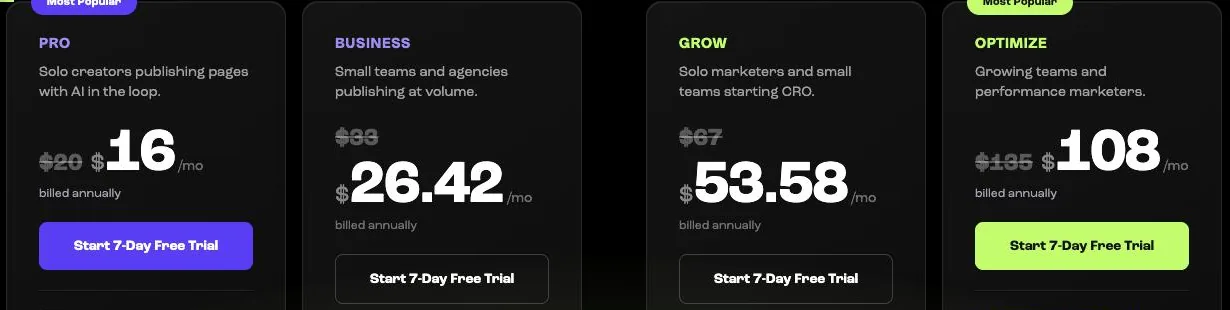
Every HTML Pub and Leadpages plan can be tried for 7 days with all its features. A bank card is required, but nothing is charged before day 7.
The essentials in 30 seconds
- Choose the plan to test
- Click « Start 7-Day Free Trial »
- Write down the end date
- Use the trial for real
- Keep it or cancel
Avoid: Forgetting the end date and being charged by mistake.
See the details with screenshots ↓Step by step
Screenshots show the interface used in the original guide (Shopify in French, Leadpages in English). In your account, buttons appear in your language.
- 1
Choose the plan to test
On the pricing page, choose monthly or annual billing, then the plan you are interested in. Test the one you really intend to keep: the trial gives access to all its features.
- 2
Click « Start 7-Day Free Trial »
Create your account with your email address, then enter a bank card. It is only used to continue after the trial.
- 3
Write down the end date
Put a reminder in your calendar one or two days before the 7 days end. That is when you decide whether to keep the plan.
- 4
Use the trial for real
Build a real page, connect your domain and your email tool. You will quickly see whether the tool suits you.
- 5
Keep it or cancel
If you like it, do nothing: the subscription starts. Otherwise, cancel before day 7 from your account settings. Your pages stay saved.
Try it yourself
Every HTML Pub and Leadpages plan has a 7-day free trial, with all features.
Try Leadpages for 7 days ↗Affiliate link: it does not change the price for you.
Common mistakes
- Forgetting the end date and being charged by mistake.
- Spending the trial browsing templates without publishing: you never find the tool's real limits.
Official sources
Get the next guides
New Leadpages, HTML Pub and Shopify guides by email, every two weeks. No spam, unsubscribe in one click.