How do you connect your domain name to Shopify?
Every store has a free .myshopify.com address. With your own domain, it looks more trustworthy. The SSL certificate (HTTPS) is free.
The essentials in 30 seconds
- Open « Domains »
- Connect an existing domain
- Otherwise, edit the DNS by hand
- Wait for verification
- Choose the primary domain
Avoid: Deleting old DNS records your email uses.
See the details with screenshots ↓Step by step
Screenshots show the interface used in the original guide (Shopify in French, Leadpages in English). In your account, buttons appear in your language.
- 1
Open « Domains »
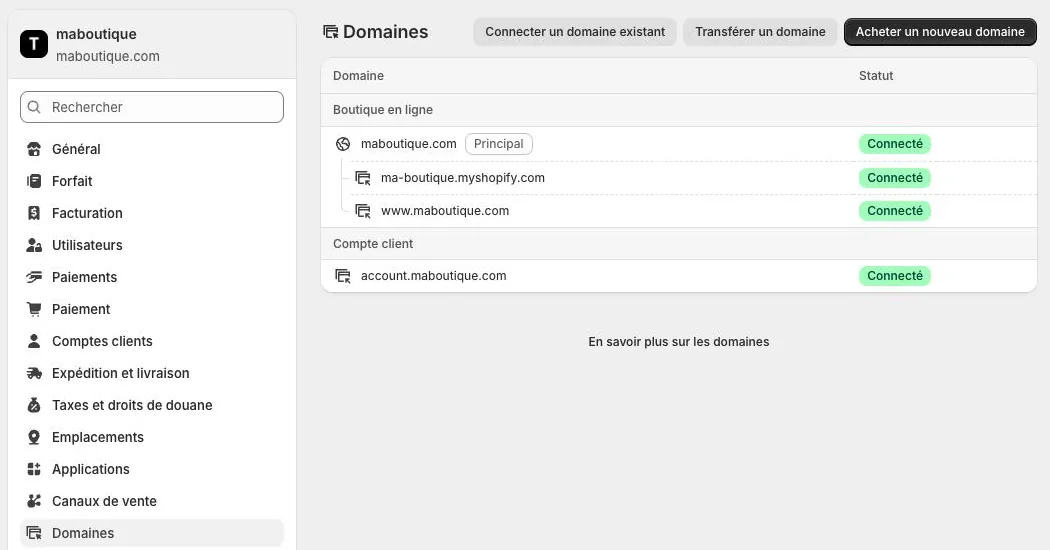
Click « Settings » at the bottom left, then « Domains ». Three choices: connect an existing domain, transfer a domain or buy a new domain.
- 2
Connect an existing domain
Choose to connect an existing domain and enter your domain. For many domain providers, Shopify offers an automatic connection.
- 3
Otherwise, edit the DNS by hand
At your domain provider, update the records Shopify shows (an A record, and a CNAME for www).
- 4
Wait for verification
The connection often works in under two hours, but can take up to two days. The status changes to « Connected ».
- 5
Choose the primary domain
If several domains are connected, mark the one customers will see as « Primary ».
Try it yourself
Shopify starts free, then has a discounted launch offer. You can set everything up before paying.
Try Shopify ↗Affiliate link: it does not change the price for you.
Common mistakes
- Deleting old DNS records your email uses.
- Forgetting that domain renewal happens at your domain provider, not at Shopify.
Official sources
Get the next guides
New Leadpages, HTML Pub and Shopify guides by email, every two weeks. No spam, unsubscribe in one click.