How do you choose your Shopify plan?
Shopify has four plans. If you're starting solo, Basic is almost always enough. The pricier plans are mostly for teams and high volumes.
The essentials in 30 seconds
- Compare the four plans
- Choose yearly or monthly billing
- Look at the fees per sale
- Start small
Avoid: Picking Advanced from day one without needing it.
See the details with screenshots ↓Step by step
Screenshots show the interface used in the original guide (Shopify in French, Leadpages in English). In your account, buttons appear in your language.
- 1
Compare the four plans
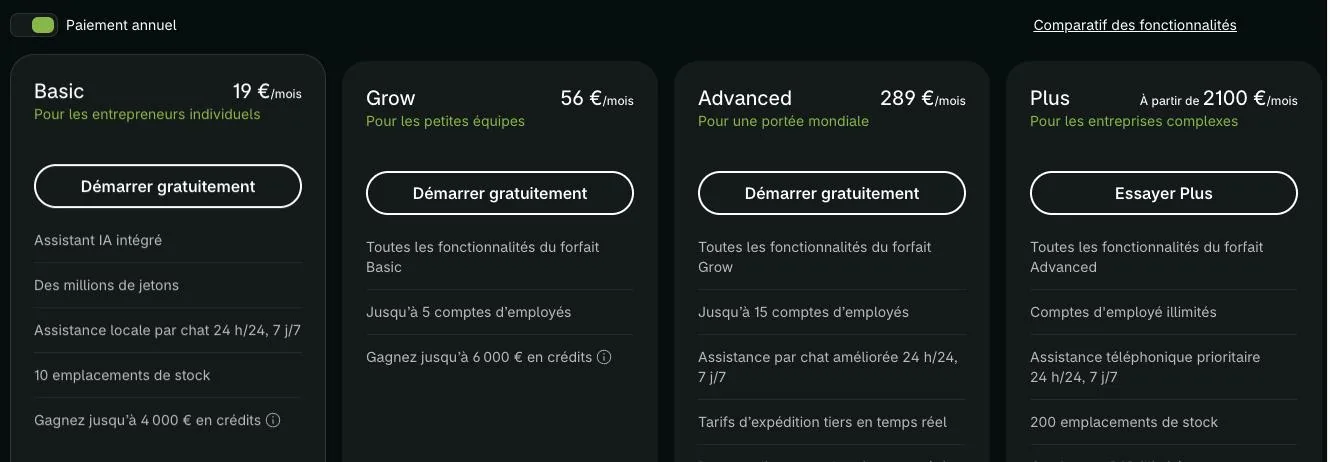
Basic for solo entrepreneurs, Grow for small teams (up to 5 staff accounts), Advanced for selling internationally with more tools (up to 15 accounts), Plus for large businesses.
- 2
Choose yearly or monthly billing
Paying yearly costs less per month. Paying monthly gives you more freedom to stop. Check both prices shown on shopify.com/pricing.
- 3
Look at the fees per sale
With Shopify Payments, card rates go down as the plan goes up. If you use another payment provider, Shopify adds transaction fees, which are higher on Basic.
- 4
Start small
Start on Basic. You can change plans later, when your sales justify it.
Try it yourself
Shopify starts free, then has a discounted launch offer. You can set everything up before paying.
Try Shopify ↗Affiliate link: it does not change the price for you.
Common mistakes
- Picking Advanced from day one without needing it.
- Forgetting the cost of paid apps, which comes on top of the plan.
Official sources
Get the next guides
New Leadpages, HTML Pub and Shopify guides by email, every two weeks. No spam, unsubscribe in one click.